Terminal
本章节介绍如何配置好用的terminal
检查shell默认是否为zsh
如果得到结果为/bin/bash说明默认为bash,如果为/bin/zsh说明默认为zsh(我的mac默认为zsh) 对于Linux服务器,通常默认为bash,我们需要将其调整为zsh,操作如下:
Warning
最好不要在vscode的terminal中完成以下步骤。
vscode容易踩坑,如下图:
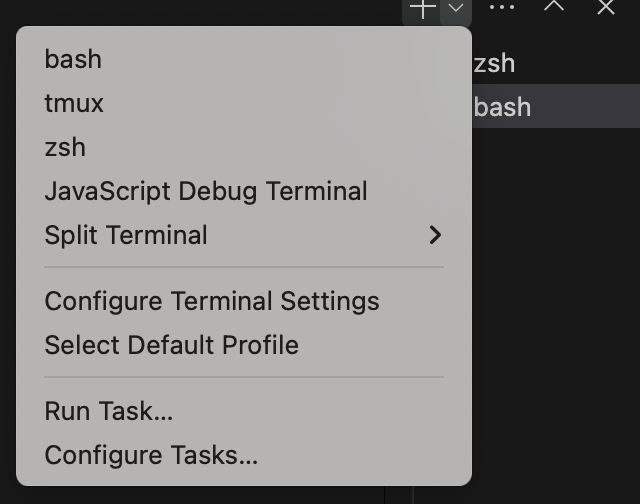
很可能你的terminal选择的是bash,这样无论你怎么操作我给的步骤,echo $SHELL时都会输出/bin/bash,这是因为vscode把当前的SHELL锁死了
如果你实在想在vscode的terminal中进行,那么需要将右上角的bash选择为zsh
如果没有zsh,下载zsh
切换到zsh:
PS: 切换回bash
下载oh-my-zsh
配置oh-my-zsh
修改.zshrc配置文件
ZSH_THEME="ys"
COMPLETION_WAITING_DOTS="true"
plugins=(git
         vi-mode
         zsh-autosuggestions
         zsh-syntax-highlighting
         extract
)
setopt no_nomatch
vi-mode:让zsh也启用vim模式 更改主题
主题详见theme
Plugins
zsh-completions
根据历史使用指令的指令自动提示补全插件。下载安装方法:
-
克隆github上该项目(默认在 ~/.oh-my-zsh/custom/plugins)
bash git clone https://github.com/zsh-users/zsh-autosuggestions ${ZSH_CUSTOM:-~/.oh-my-zsh/custom}/plugins/zsh-autosuggestions -
将 zsh-autosuggestions 添加到 ~/.zshrc 中
-
重启zsh
zsh-syntax-highlighting
zsh指令语法高亮。
下载安装:
- Clone this repository in oh-my-zsh's plugins directory:
git clone https://github.com/zsh-users/zsh-syntax-highlighting.git ${ZSH_CUSTOM:-~/.oh-my-zsh/custom}/plugins/zsh-syntax-highlighting
- 配置 ~/.zshrc 的 plugins
- 重启zsh